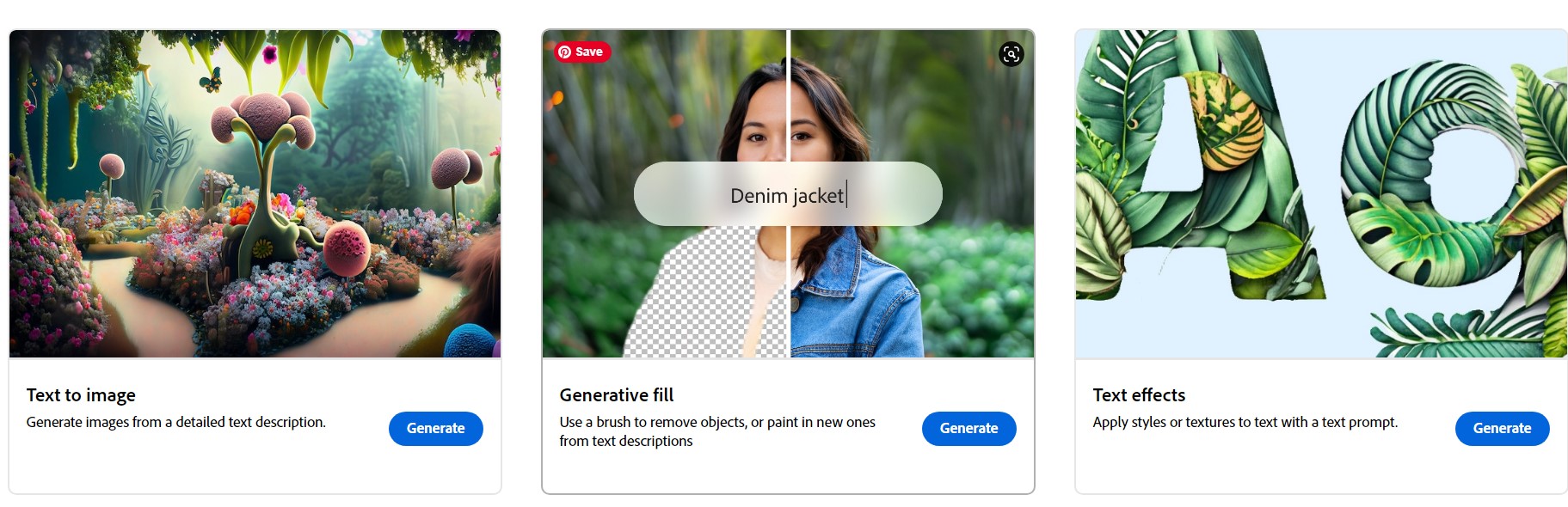
Adobe Firefly is Adobe’s family of creative generative AI models. In plain terms, it lets you create images, text effects, and other visuals simply by describing what you want in words. Type a prompt, and Firefly generates it — no design degree required. Because it’s built by Adobe, it’s woven directly into tools millions of creators already use, like Photoshop and Express, which makes it one of the most practical AI image tools for everyday work.
What is Adobe Firefly?
Firefly is a text-to-image and creative generation tool. You give it a description — say, “a cosy coffee shop on a rainy evening, warm lighting, watercolor style” — and it produces original images to match. Beyond images, Firefly can create stylised text effects, recolor artwork, and generate variations of a design in seconds. What began as a standalone tool is now deeply integrated across Adobe’s Creative Cloud apps.
How does Adobe Firefly work?
Firefly is powered by Adobe’s AI technology, trained on a large library of images, licensed content, and public-domain material. You describe what you want in natural language, and the model interprets your prompt to generate matching visuals. You can then refine the result by adjusting the wording, choosing a different art style, changing the aspect ratio, or generating fresh variations until it looks right.
One reason Firefly stands out is Adobe’s focus on commercial safety. Adobe has designed Firefly to be trained on content it has the rights to use, which makes creators more comfortable using the output in professional and commercial projects — a genuine concern with some other AI image generators.
What can you do with Adobe Firefly?
Firefly is flexible enough for beginners and professionals alike. Some of the most popular uses include:
- Generate images from text: Create original artwork, illustrations, and concepts from a simple description.
- Generative Fill in Photoshop: Add, remove, or extend parts of a photo just by describing the change — one of Firefly’s most loved features.
- Text effects: Turn plain words into stylised, textured lettering for posters, logos, and social posts.
- Recolor and restyle: Instantly try new color palettes on vector artwork.
- Social and marketing content: Produce thumbnails, ad creatives, and banners quickly, without starting from a blank canvas.
Who is Firefly for?
Firefly is useful for a surprisingly wide range of people. Small business owners can create marketing visuals without hiring a designer. Content creators and bloggers can generate custom featured images and thumbnails. Professional designers use it to speed up brainstorming and handle tedious edits, freeing time for higher-value creative work. Even complete beginners can produce polished results because the interface is built around plain-language prompts rather than complex tools.
How do you get started with Adobe Firefly?
You can access Firefly through Adobe’s website and, if you subscribe to Creative Cloud, directly inside apps like Photoshop and Adobe Express. Adobe typically offers a set of free generation credits so you can experiment before committing, with paid plans unlocking higher usage. The best way to learn is simply to start: write a clear, specific prompt, generate a few options, and refine from there.
A few tips for better results
- Be specific. Mention subject, setting, mood, lighting, and art style. “A red bicycle” gives weaker results than “a vintage red bicycle leaning on a stone wall, golden-hour light, soft focus.”
- Iterate. Your first result is a starting point. Tweak the wording and regenerate.
- Combine with editing tools. Generate a base image, then use Photoshop’s Firefly-powered features to refine it.
The bottom line
Adobe Firefly makes professional-quality visual creation accessible to almost anyone. Its tight integration with Photoshop and Express, plus Adobe’s emphasis on commercially-safe training data, make it one of the most usable AI creative tools available today. Whether you’re running a business, creating content, or just experimenting, Firefly is well worth trying.